🗣️InterviewsBeginnerproduction
Three-Point Lighting for Interviews
Set up professional interview lighting with just three lights. Key light, fill light, and backlight explained simply.
🎥 Video Example
📐 Setup Diagram
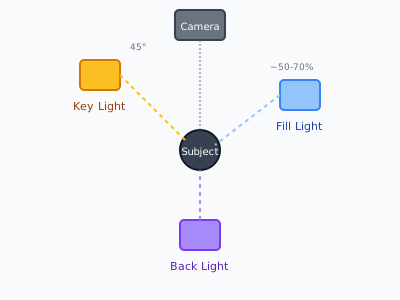
Overhead diagram showing three-point lighting setup with key, fill, and back light positions
📝 Step-by-Step
- 1
Place the key light
Position your brightest light 45° to one side of the subject, slightly above eye level.
- 2
Add fill light
Place a softer light on the opposite side at 50-70% of key light intensity to reduce shadows.
- 3
Set the backlight
Position behind and above the subject to create a rim of light separating them from the background.
- 4
Fine-tune
Check the monitor for hot spots, harsh shadows, or light spilling onto the background.
✅ Checklist
- ☐Position key light 45° to subject
- ☐Set fill light opposite at lower intensity
- ☐Add backlight to separate subject from background
- ☐Check for unwanted shadows
- ☐White balance your camera
🎒 Equipment
- • 2-3 LED panels or softboxes
- • Light stands
- • Diffusion material
#lighting#setup#interviews