🎬A-RollIntermediateproduction
Multi-Camera A-Roll Setup
Use two or more cameras to give yourself editing flexibility and visual variety in interviews and presentations.
📐 Setup Diagram
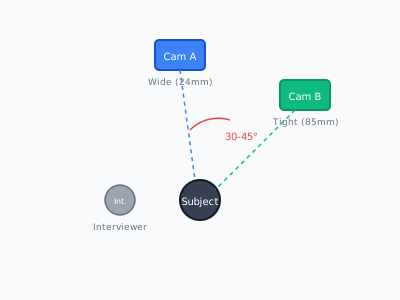
Overhead diagram showing two-camera interview setup with 30-degree angle offset
📝 Step-by-Step
- 1
Position camera A
Place your primary camera at subject eye level, slightly off-center for a natural look.
- 2
Position camera B
Set 30-45° offset from camera A. Use a tighter focal length for variety.
- 3
Match settings
Sync white balance, frame rate, and exposure across both cameras.
- 4
Create a sync point
Clap hands or use a slate at the start of each take for easy sync in post.
✅ Checklist
- ☐Match white balance across all cameras
- ☐Sync timecode or use a clap/slate
- ☐Vary focal lengths between cameras (wide + tight)
- ☐Offset cameras by 30-45 degrees
- ☐Monitor both feeds simultaneously if possible
🎒 Equipment
- • 2+ cameras
- • Matching lenses or zoom lenses
- • Audio recorder with timecode
- • Monitor/switcher
#multicam#setup#editing-flexibility