🎙️VoiceoverIntermediatepost production
Home Voiceover Recording Setup
Record broadcast-quality voiceovers at home with minimal equipment. Covers room treatment, mic technique, and recording settings.
🎥 Video Example
📐 Setup Diagram
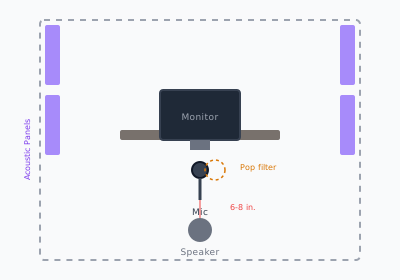
Diagram showing home voiceover setup with mic position, acoustic treatment, and monitor placement
📝 Step-by-Step
- 1
Treat the room
Hang blankets or place acoustic panels at reflection points. A closet full of clothes works in a pinch.
- 2
Position the mic
Place 6-8 inches from your mouth, slightly off-axis to reduce plosives.
- 3
Set levels
Speak at your loudest and set gain so peaks hit -12dB. This leaves headroom.
- 4
Record room tone
Capture 10 seconds of silence. This helps with noise reduction in post.
- 5
Do a test read
Record 30 seconds, play back with headphones, and adjust before the full session.
✅ Checklist
- ☐Choose a quiet, carpeted room
- ☐Position mic 6-8 inches from mouth
- ☐Use a pop filter
- ☐Record at 48kHz/24-bit
- ☐Leave 2 seconds of room tone at start
- ☐Monitor with headphones while recording
🎒 Equipment
- • USB condenser mic (e.g., Audio-Technica AT2020)
- • Pop filter
- • Headphones
- • Acoustic panels or blankets
#audio#recording#home-studio